
MongoDB多表关联查询的语句是什么?怎么样操作?
Admin 2021-05-13 群英技术资讯 2761 次浏览

我们在使用MongoDB时,经常需要进行MongoDB多表关联查询,因此多表关联查询也是需要掌握的内容,本文就给大家分享一下MongoDB多表关联查询实例,有需要的朋友可以看看。
Mongoose的多表关联查询
首先,我们回忆一下,MySQL多表关联查询的语句:
student表:
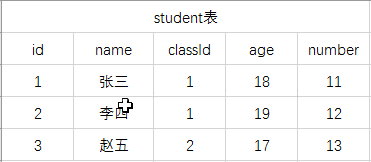
calss表:

通过student的classId关联进行查询学生名称,班级的数据:SELECT student.name,student.age,class.name FROM student,class WHERE student.classId = class.id
Mongoose多表联合查询(还是以众所周知的学生、班级作为实例)
・ 表结构的定义(schemas目录下)
1. student表(student.js)
var mongoose = require('mongoose');
var Schema = mongoose.Schema;
/*定义数据模式*/
var StudentSchema = new mongoose.Schema({
  name: String,
  calssId: {
    type: Schema.Types.objectId,
    ref: 'class'
  },
  age: Number,
  number: Number,
  meta: {
    createAt: {
      type: Date,
      default: Date.now()
    },
    updateAt: {
      type: Date,
      default: Date.now()
    }
  }
  /*更新时间的*/
});
module.exports = StudentSchema;
2. class表(class.js)
var mongoose = require('mongoose');
var Schema = mongoose.Schema;
/*定义数据模式*/
var ClassSchema = new mongoose.Schema({
  name: String,
  meta: {
    createAt: {
      type: Date,
      default: Date.now()
    },
    updateAt: {
      type: Date,
      default: Date.now()
    }
  }
  /*更新时间的*/
});
module.exports = ClassSchema;
・ 生成Model(model目录下)
1. student Model(student.js)
var mongoose = require('mongoose');
var StudentSchema = require('../schemas/student');
/*通过model编译模式为模型*/
var Student = mongoose.model('student', StudentSchema);
/*导出Student模型 模块*/
module.exports = Student;
2. class Model(class.js)
var mongoose = require('mongoose');
var ClassSchema = require('../schemas/class');
/*通过model编译模式为模型*/
var Class = mongoose.model('class', ClassSchema);
/*导出Class模型 模块*/
module.exports = Class;
・ Model进行数据的查询操作
1. 将静态类的方法加到Model的编译中
StudentSchema.static = {
  fetch: function(cb){
 return this
   .find({})
   .sort('meta.updateAt') //按更新的时间排序
  }
}
2. 将静态类方法加到Model中
StudentSchema.static('fetch', function(cb){
   return this
     .find({}, cb)
  .sort('meta.updateAt')
})
3. 直接调用model的find()方法
查询的结果均为:
[
{
_id: '5a05222f583e5720b8660191',
name: '张三',
age: 18,
number: 11,
classId: '5a0036512b740f32e4371e66'
},
{
_id: '5a05222f583e5720b8660091',
name: '李四',
age: 19,
number: 11,
classId: '5a0036512b740f32e1371e66'
},
{
_id: '5a05222f583e5720b18660191',
name: '赵五',
age: 17,
number: 11,
classId: '5a0036512b7420f32e4371e66'
}
]
・ 多表联合查询(学生对应班级)
StudentSchema.static = {
  findStudentWithClass: function (cb) {
    return this
      .find({})
      .populate('classId')//注意这是联合查询的关键
      .sort('meta.updateAt')
      .exec(cb)
  }
}
查询结果:
[
{
_id: '5a05222f583e5720b8660191',
name: '张三',
age: 18,
number: 11,
classId: {
_id: '5a0036512b740f32e4371e66',
name: '一年1班'
}
},
{
_id: '5a05222f583e5720b8660091',
name: '李四',
age: 18,
number: 11,
classId: {
_id: '5a0036512b740f32e1371e66',
name: '二年2班'
}
},
{
_id: '5a05222f583e5720b18660191',
name: '赵五',
age: 18,
number: 11,
classId: {
_id: '5a0036512b7420f32e4371e66',
name: '一年2班'
}
}
]
・ 由上面的实例可知,mongoose的多表联合查询的关键:
1. 数据模式结构定义需要利用关键字ref定义关联
var Schema = new mongoose.Schema({
  field: {
 type: mongoose.Schema.Type.ObjectId,
 ref: 'model'
  }
});
Schema.static = {
  fetch: function(cb){
 return this
    .find({})
    .populate('field')
    .exec(cb)
 }
 }
var Model = mongoose.Model('model',Schema );
以上就是关于MongoDB多表关联查询的介绍,上述示例有一定的借鉴价值,有需要的朋友可以参考,希望文本对大家学习有帮助,想要了解更多MongoDB多表关联查询的内容大家可以关注其他相关文章。

免责声明:本站发布的内容(图片、视频和文字)以原创、转载和分享为主,文章观点不代表本网站立场,如果涉及侵权请联系站长邮箱:mmqy2019@163.com进行举报,并提供相关证据,查实之后,将立刻删除涉嫌侵权内容。
猜你喜欢
-
MongoDB主从读写分离如何实现,过程是怎样
这篇文章主要介绍了 mongoDB 实现主从读写分离实现的实例代码的相关资料,需要的朋友可以参考下
-
MongoDB删除数据库的语法是什么,实例是怎样的
MongoDB 删除数据库 语法 MongoDB 删除数据库的语法格式如下: db.dropDatabase() 删除当前数据库,默认为 test,你可以使用 db 命令查看当前数据库名。 实例 以下实例我们删除了数据库 runoob。 首先,查看所有数据库: > show dbs admin 0.000GB config 0.000GB local 0.000GB runoob 0.000GB 接下来我们切换到数..
-
MongoDB如何做模糊和精确查询,用什么方法
这篇文章主要介绍了Java操作mongodb的模糊查询和精确查询,使用regex关键字实现模糊查询操作,具体实现代码大家参考下本文
-
MongoDB数据库中怎样执行js文件,有哪些事项要注意
MongoDB Shell 中使用的 use admin、 show users、show collections 指令以及类似的指令不能出现在 js 文件中。因为它不是 JavaScript 语法,我们只能在 js 文件调用对应的方法。
-
MongoDB中导出数据库文件的SQL语句是什么
在mongodb中可以使用mongoexport命令将数据库文件导出为JSON格式或CSV格式的文件,可以通过参数指定导出的数据项,也可以根据指定的条件导出数据。


推荐内容
成为群英会员,开启智能安全云计算之旅
立即注册关注或联系群英网络
7x24小时售前:400-678-4567
7x24小时售后:0668-2555666

24小时QQ客服

群英微信公众号
CNNIC域名投诉举报处理平台
服务电话:010-58813000
服务邮箱:service@cnnic.cn
投诉与建议:0668-2555555
Copyright © QY Network Company Ltd. All Rights Reserved. 2003-2020 群英 版权所有
增值电信经营许可证 : B1.B2-20140078 ICP核准(ICP备案)粤ICP备09006778号 域名注册商资质 粤 D3.1-20240008



