
PHP中怎么编写日历表?实现一个简单日历的实例
Admin 2021-04-27 群英技术资讯 1970 次浏览

PHP中怎么编写日历表?日历表能够清楚的展示年月日信息,那么我们如何用PHP来实现呢?下面是实现一个简单日历表的代码,感兴趣的朋友可以看一看。
calendar.class.php
<?php
/*
* 创建一个日历类
*
*
*/
 //修改默认时区
 date_default_timezone_set("PRC");

 class Calendar {
  private $year;
 private $month;
 private $day; //当月总天数
 private $first_week; //每月的第一天是星期几

 //构造函数
 function __construct() {
  $this->year = isset($_GET['year'])?$_GET['year']:date("Y");
  $this->month = isset($_GET["month"])?$_GET["month"]:date("m");
  $this->first_week = date("w", mktime(0, 0 ,0, $this->month, 1, $this->year));
  $this->day = date("t", mktime(0, 0 ,0, $this->month, 1, $this->year));
 }
 function showCalendar() {
 //  echo $this->year."年".$this->month."月".$this->first_week."天".$this->day;
   echo "<table align='center'>"; //用表格输出
   $this->chageDate("index.php"); //用于用户调整年月份
  $this->weekList();//显示星期
  $this->dayList(); //显示天数

  echo "</table>";
 }
 //1、显示星期
 private function weekList() {
  $week = array("日","一","二","三","四","五","六");
  echo "<tr>";
   for ($i = 0; $i < count($week); $i++) {
   echo "<th>".$week[$i]."</th>";
  }
  echo "</tr>";
 }
 //2.显示天数
 private function dayList() {
  $color = "#2ca50c";
  echo "<tr>";
  for ($i = 0; $i < $this->first_week; $i++) { //输出空格,弥补当前月空缺部分
   echo "<td bgcolor='#2ca50c'> </td>";
  }
  for ($k = 1; $i <= $this->day; $k++) {
   $i++;
   if ($k == date("d")) echo "<td id='nowd'>".$k."</td>"; //是今天,加效果
   else echo "<td bgcolor=$color>".$k."</td>";
   if ($i % 7 == 0) {
   echo "</tr><tr>"; //每7天一次换行
   if ($i % 2 == 0) $color = "#2ca50c";
   else $color = "#9ddb27"; //实现各行换色的效果
   }
  }
  while ($i % 7 != 0) { //将剩余的空格补完
   echo "<td bgcolor='#2ca50c'> </td>";
  $i++;
  }
  echo "</tr>";
 }

 //3、用于用户调整天数
 private function chageDate($url="index.php") {
  echo "<tr>";
   echo "<caption><h1>".$this->year."年".$this->month."月</h1></caption>";
  echo "</tr>";
  echo "<tr>";
  echo "<td>"."<a href='?".$this->prevYear($this->year,$this->month)."'>"."<"."</a>";
  echo "<td>"."<a href='?".$this->prevMonth($this->year,$this->month)."'>"."<<"."</a>";

  echo "<td colspan='3'>";
   echo '<select οnchange="window.location=\''.$url.'?year=\'+this.options[selectedIndex].value+\'&month='.$this->month.'\'">';
    for ($year = 2038; $year >= 1970; $year--) {
    $selected = ($year == $this->year)?"selected":"";
    echo '<option '.$selected. ' value="'.$year.'">'.$year.'</option>';
    //echo '<option '.$selected.' value="'.$year.'">'.$year.'</option>';
   }
   echo "</select>";

  echo '<select name="month" οnchange="window.location=\''.$url.'?year='.$this->year.'&month=\'+this.options[selectedIndex].value">';
  for($month=1;$month <= 12;$month++){
   $selected1 = ($month == $this->month) ? "selected" : "";
   echo '<option '.$selected1.' value="'.$month.'">'.$month.'</option>';
  }
  echo '</select>';
  echo "</td>";


  echo "<td>"."<a href='?".$this->nextMonth($this->year,$this->month)."'>".">>"."</a>";
  echo "<td>"."<a href='?".$this->nextYear($this->year,$this->month)."'>".">"."</a>";
  echo "</tr>";
 }

 private function prevYear($year, $month) { //获取上一年的数据
  $year--;
  if ($year < 1970) $year = 1970;
  return "year={$year}&month={$month}";
 }
 private function prevMonth($year, $month) {
  if ($month == 1) {
   $year--;
  if ($year < 1970) $year = 1970;
  $month = 12;
  }else $month--;
  return "year={$year}&month={$month}";
 }
 private function nextYear($year, $month) { //获取上一年的数据
  $year++;
  if ($year > 2038) $year = 2038;
  return "year={$year}&month={$month}";
 }
 private function nextMonth($year, $month) {
  if ($month == 12) {
   $year++;
  if ($year > 2038) $year = 2038;
  $month = 1;
  }else $month++;
  return "year={$year}&month={$month}";
 }
 }
主页 index.php
<!doctype html>
<html>
<head>
<meta charset="utf-8">
<title>日历显示</title>
<style>
 table {
 border:1px solid #050;
 margin: 100px auto;
 }
 th {
  width: 30px;
 background-color: #0CC;
 color: #fff;
 height: 30px;
 font-size: 20px;
 }
 #nowd {
  color: yellow;
 background: #F00;
 }
 td {
  width: 30px;
 text-align: center;

 height: 25px;
 color: #fff;
 }
 a {
 display: block;
 width: 35px;
 height: 35px;
 background: #0F9;
  text-decoration: none;
 text-align: center;
 line-height: 35px;
 }
 a:hover {
  background: #CF0;
 color: #fff;
 font-size: 20px;
 }
</style>
</head>

<body>
 <?php
 include "calendar.class.php";
 $ca = new Calendar();
 $ca->showCalendar();
 ?>
</body>
</html>
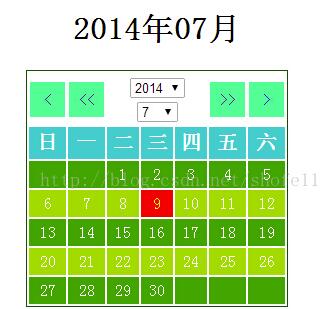
以上就是关于PHP怎么编写日历表的介绍,上文有具体的代码及注释,有需要的朋友可以参考参考,希望对大家学习有帮助。

免责声明:本站发布的内容(图片、视频和文字)以原创、转载和分享为主,文章观点不代表本网站立场,如果涉及侵权请联系站长邮箱:mmqy2019@163.com进行举报,并提供相关证据,查实之后,将立刻删除涉嫌侵权内容。
猜你喜欢
-
PHP中错误处理的相关知识点有哪些,如何理解
在之前的文章中给大家带来了《一定搞得懂PHP中如何添加图片水印》,其中通过过示例给大家详细介绍了在PHP中应该如何添加水印,本篇文章我们继续来看一下PHP中错误处理的相关知识,希望能帮助到大家!
-
PHP中PDO::quote用于做什么,怎么使用
今天小编就为大家分享一篇关于PDO::quote讲解,小编觉得内容挺不错的,现在分享给大家,具有很好的参考价值,需要的朋友一起跟随小编来看看吧
-
PHP7安装intl扩展的步骤是什么
php7安装intl扩展的方法:1、下载icu源码包;2、解压icu及编译安装;3、下载并解压php包;4、进入php解压包目录下,编译安装;5、配置文件及启动文件即可。
-
swoole中怎样使用常量的,方法是什么
swoole使用常量,Client::MSG_WAITALL,用于Client->recv()方法的第二个参数,阻塞等待直到收到指定长度的数据后返回。
-
PhpStorm编辑器中注释时间要怎样做
我们先添加热键 在Live Templates中添加名字叫user的模板,里面建一个比如说叫xxx的子类,然后再下面的Templates text写入;然后点击Edit variables ;然后点击Change


推荐内容
成为群英会员,开启智能安全云计算之旅
立即注册关注或联系群英网络
7x24小时售前:400-678-4567
7x24小时售后:0668-2555666

24小时QQ客服

群英微信公众号
CNNIC域名投诉举报处理平台
服务电话:010-58813000
服务邮箱:service@cnnic.cn
投诉与建议:0668-2555555
Copyright © QY Network Company Ltd. All Rights Reserved. 2003-2020 群英 版权所有
增值电信经营许可证 : B1.B2-20140078 ICP核准(ICP备案)粤ICP备09006778号 域名注册商资质 粤 D3.1-20240008



