
php分页功能怎么做?详解php封装实现实例
Admin 2021-05-12 群英技术资讯 1737 次浏览

我们在做开发的时候,如果数据太多就会使用分页功能。下面小编就给大家分享一个使用php封装实现的page分页类,感兴趣的朋友可以了解一下,下面是实现效果。
效果图
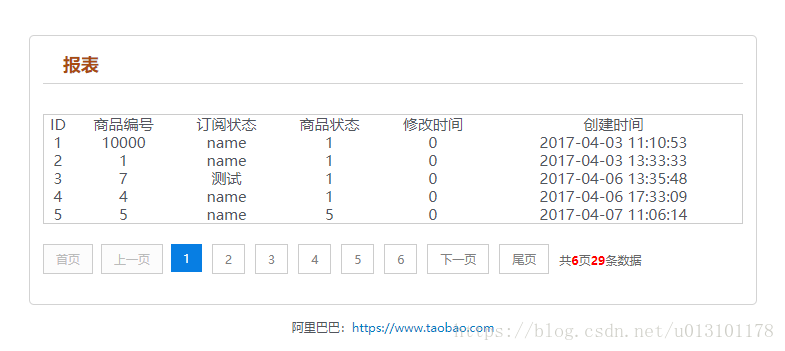
1.测试实例test.php
<?php
header("Content-Type: text/html; charset=utf-8");
date_default_timezone_set("Asia/Shanghai"); //时区

require_once('page.class.php');

$showrow = 5;
$curpage = empty($_GET['page']) ? 1 : $_GET['page'];
$url = "?page={page}";
$dsn = 'mysql:host=xxx.xxx.80.xxx;dbname=admin';
$pdo = new PDO($dsn, 'root', 'root');
$pdo->query('set names utf8');
$sql = "SELECT * from operator_list where 1=1";

$res_gg = $pdo->query("SELECT count(*) as ctn from operator_list where 1=1;");
$result = $res_gg->fetch();

$total = $result["ctn"];

if (!empty($_GET['page']) && $total != 0 && $curpage > ceil($total / $showrow)) {
 $curpage = ceil($total_rows / $showrow);
}
$sql .= " LIMIT " . ($curpage - 1) * $showrow . ",$showrow;";

$res_zz = $pdo->query($sql);
$result = $res_zz->fetchAll();

//print_r(json_encode($result));die;

?>

<!DOCTYPE html PUBLIC "-//W3C//DTD XHTML 1.0 Transitional//EN"
 "http://www.w3.org/TR/xhtml1/DTD/xhtml1-transitional.dtd">
<html xmlns="http://www.w3.org/1999/xhtml">
<head>
 <meta http-equiv="Content-Type" content="text/html; charset=utf-8"/>
 <title></title>
 <meta name="keywords" content="入库"/>
 <meta name="description" content="入库"/>
 <script type="text/javascript" src="static/js/jquery-1.11.0.min.js?v=1"></script>
 <link rel="stylesheet" type="text/css" href="static/css/common.css" rel="external nofollow" />
</head>
<body>
<div class="head">
 <!-- <div class="head_inner clearfix">-->
 <!--  <ul id="nav">-->
 <!--   <li><a href="javascript;" rel="external nofollow" rel="external nofollow" >商品列表</a></li>-->
 <!--   <li><a href="javascript;" rel="external nofollow" rel="external nofollow" >详情列表</a></li>-->
 <!--  </ul>-->
 <!--    <a class="logo" href="javascript" rel="external nofollow" >
      <img src="javascript;" alt="公司logo" /></a> -->
 <!-- </div>-->
</div>
<div class="container">
 <div class="demo">
  <h2 class="title">报表</h2>

  <div class="showData">
   <table width="100%" border="0" align="center"
   style="border:1px solid #ccc;" cellpadding="0" cellspacing="1">
    <tr align="center">
     <td>ID</td>
     <td>商品编号</td>
     <td>订阅状态</td>
     <td>商品状态</td>
     <td>修改时间</td>
     <td>创建时间</td>
    </tr>
    <?php
    if (!empty($result)) {
     foreach ($result as $k => $v) {
      ?>
      <tr align="center">
       <td><?php echo $v['id']; ?></td>
       <td><?php echo $v["customer_id"]; ?></td>
       <td><?php echo $v["name"]; ?></td>
       <td><?php echo $v["role_id"]; ?></td>
       <td><?php echo $v["status"]; ?></td>
       <td><?php echo $v["cdate"]; ?></td>
      </tr>
      <?php
     }
    }
    ?>
   </table>
  </div>
  <div class="showPage">
   <?php
   if ($total > $showrow) {//总记录数大于每页显示数,显示分页
    $page = new page($total, $showrow, $curpage, $url, 3);
    echo $page->myde_write();
   }
   ?>
  </div>
 </div>
</div>
<div class="foot">
 阿里巴巴:<a href="#" rel="external nofollow" target="_blank">https://www.taobao.com</a>
</div>
</body>
</html>
2.封装的page分页类page.class.php
<?php

/* * *********************************************
 * @类名: page
 * @参数: $myde_total - 总记录数
 *   $myde_size - 一页显示的记录数
 *   $myde_page - 当前页
 *   $myde_url - 获取当前的url
 * @功能: 分页实现
 */

class page {

 private $myde_total;   //总记录数
 private $myde_size;   //一页显示的记录数
 private $myde_page;   //当前页
 private $myde_page_count;  //总页数
 private $myde_i;    //起头页数
 private $myde_en;    //结尾页数
 private $myde_url;   //获取当前的url
 /*
  * $show_pages
  * 页面显示的格式,显示链接的页数为2*$show_pages+1。
  * 如$show_pages=2那么页面上显示就是[首页] [上页] 1 2 3 4 5 [下页] [尾页]
  */
 private $show_pages;

 public function __construct($myde_total = 1, $myde_size = 1, $myde_page = 1, $myde_url, $show_pages = 2) {
  $this->myde_total = $this->numeric($myde_total);
  $this->myde_size = $this->numeric($myde_size);
  $this->myde_page = $this->numeric($myde_page);
  $this->myde_page_count = ceil($this->myde_total / $this->myde_size);
  $this->myde_url = $myde_url;
  if ($this->myde_total < 0)
   $this->myde_total = 0;
  if ($this->myde_page < 1)
   $this->myde_page = 1;
  if ($this->myde_page_count < 1)
   $this->myde_page_count = 1;
  if ($this->myde_page > $this->myde_page_count)
   $this->myde_page = $this->myde_page_count;
  $this->limit = ($this->myde_page - 1) * $this->myde_size;
  $this->myde_i = $this->myde_page - $show_pages;
  $this->myde_en = $this->myde_page + $show_pages;
  if ($this->myde_i < 1) {
   $this->myde_en = $this->myde_en + (1 - $this->myde_i);
   $this->myde_i = 1;
  }
  if ($this->myde_en > $this->myde_page_count) {
   $this->myde_i = $this->myde_i - ($this->myde_en - $this->myde_page_count);
   $this->myde_en = $this->myde_page_count;
  }
  if ($this->myde_i < 1)
   $this->myde_i = 1;
 }

 //检测是否为数字
 private function numeric($num) {
  if (strlen($num)) {
   if (!preg_match("/^[0-9]+$/", $num)) {
    $num = 1;
   } else {
    $num = substr($num, 0, 11);
   }
  } else {
   $num = 1;
  }
  return $num;
 }

 //地址替换
 private function page_replace($page) {
  return str_replace("{page}", $page, $this->myde_url);
 }

 //首页
 private function myde_home() {
  if ($this->myde_page != 1) {
   return "<a href='" . $this->page_replace(1) . "' title='首页'>首页</a>";
  } else {
   return "<p>首页</p>";
  }
 }

 //上一页
 private function myde_prev() {
  if ($this->myde_page != 1) {
   return "<a href='" . $this->page_replace($this->myde_page - 1) . "' title='上一页'>上一页</a>";
  } else {
   return "<p>上一页</p>";
  }
 }

 //下一页
 private function myde_next() {
  if ($this->myde_page != $this->myde_page_count) {
   return "<a href='" . $this->page_replace($this->myde_page + 1) . "' title='下一页'>下一页</a>";
  } else {
   return"<p>下一页</p>";
  }
 }

 //尾页
 private function myde_last() {
  if ($this->myde_page != $this->myde_page_count) {
   return "<a href='" . $this->page_replace($this->myde_page_count) . "' title='尾页'>尾页</a>";
  } else {
   return "<p>尾页</p>";
  }
 }

 //输出
 public function myde_write($id = 'page') {
  $str = "<div id=" . $id . ">";
  $str.=$this->myde_home();
  $str.=$this->myde_prev();
  if ($this->myde_i > 1) {
   $str.="<p class='pageEllipsis'>...</p>";
  }
  for ($i = $this->myde_i; $i <= $this->myde_en; $i++) {
   if ($i == $this->myde_page) {
    $str.="<a href='" . $this->page_replace($i) . "' title='第" . $i . "页' class='cur'>$i</a>";
   } else {
    $str.="<a href='" . $this->page_replace($i) . "' title='第" . $i . "页'>$i</a>";
   }
  }
  if ($this->myde_en < $this->myde_page_count) {
   $str.="<p class='pageEllipsis'>...</p>";
  }
  $str.=$this->myde_next();
  $str.=$this->myde_last();
  $str.="<p class='pageRemark'>共<b>" . $this->myde_page_count .
    "</b>页<b>" . $this->myde_total . "</b>条数据</p>";
  $str.="</div>";
  return $str;
 }

}

?>
3.css样式
html, body, div, span, h1, h2, h3, h4, h5, h6, p, pre,
a, code, em, img, small, strong, sub, sup, u, i, center,
dl, dt, dd, ol, ul, li, fieldset, form, label {
 margin: 0;
 padding: 0;
 border: 0;
 outline: 0;
 font-size: 100%;
 vertical-align: baseline;
 background: transparent
}

a {
 color: #007bc4;
 text-decoration: none;
 cursor: pointer;
}

.table_parameters a:hover {
 text-decoration: none
}

a:hover {
 text-decoration: underline
}

ol, ul {
 list-style: none
}

table {
 border-collapse: collapse;
 border-spacing: 0
}

/*html {*/
/*background: url(../images/demo_bg.png)*/
/*}*/

body {
 height: 100%;
 font: 12px/18px "Microsoft Yahei", Tahoma, Helvetica,
 Arial, Verdana, "\5b8b\4f53", sans-serif;
 color: #51555c
}

img {
 border: 0;
 cursor: pointer;
}

.clearfix:after {
 visibility: hidden;
 display: block;
 font-size: 0;
 content: " ";
 clear: both;
 height: 0
}

.head {
 /*border-bottom: 1px solid #dadada;*/
 padding: 0 0 5px
}

.head_inner {
 margin: 0 auto;
 width: 980px
}

.container {
 width: 80%;
 /*min-height: 600px;*/
 margin: 30px auto 0 auto;
 border: 1px solid #d3d3d3;
 background: #fff;
 -moz-border-radius: 5px;
 -khtml-border-radius: 5px;
 -webkit-border-radius: 5px;
 border-radius: 5px
}

.demo > h2.title {
 margin: 4px 0 30px;
 padding: 15px 0 10px 20px;
 border-bottom: 1px solid #d3d3d3;
 font-size: 18px;
 color: #a84c10;
 background: url(../images/arrow.jpg) no-repeat 2px 14px
}

.foot {
 height: 60px;
 padding: 10px 2px;
 line-height: 24px;
 text-align: center
}

.foot a:hover {
 color: #51555c
}

.btn {
 -webkit-border-radius: 3px;
 -moz-border-radius: 3px;
 -ms-border-radius: 3px;
 -o-border-radius: 3px;
 border-radius: 3px;
 background-color: #ff8400;
 color: #fff;
 display: inline-block;
 height: 28px;
 line-height: 28px;
 text-align: center;
 padding: 0 12px;
 transition: background-color .2s linear 0s;
 border: 0;
 cursor: pointer
}

.btn:hover {
 background-color: #e95a00;
 text-decoration: none
}

.demo {
 width: 700px;
 margin: 0 auto
}

ul.ul_demo li {
 background: url("../images/demo_icon.gif") no-repeat scroll 0 6px;
 line-height: 28px;
 padding-left: 20px
}

.input, .table input[type='text'] {
 border: 1px solid #ccc;
 padding: 0 5px;
 width: 220px;
 height: 26px;
 line-height: 26px
}

#nav {
 float: right;
 margin: 30px 0 0
}

#nav li {
 float: left;
 font-size: 16px;
 margin-right: 20px
}

.btn.loading {
 opacity: .5
}

h3 a.cur {
 color: #f30;
}

.demo h3 a {
 font-size: 14px;
 margin: 0 10px 5px 0;
 display: inline-block
}

.red {
 color: red
}

.notice {
 font-size: 14px;
 margin-bottom: 10px;
}

.table_parameters {
 border-left: 1px solid #d3d3d3;
 border-top: 1px solid #d3d3d3;
 margin: 6px auto;
 font-size: 14px
}

.table_parameters tr.tr_head {
 background: none repeat scroll 0 0 #f7f7f7;
 font-weight: bold;
 padding: 6px;
 text-align: center
}

.table_parameters td, .table_parameters th {
 border-bottom: 1px solid #d3d3d3;
 border-right: 1px solid #d3d3d3;
 line-height: 26px;
 padding: 2px
}

h1 {
 font: 32px "Microsoft Yahei";
 margin: 40px auto;
 text-align: center;
}

h2 {
 font-size: 16px;
 margin: 10px 0;
}

.menu {
 height: 30px;
 margin-bottom: 30px;
 padding: 10px;
 background-color: #f0f0f0;
 text-align: center;
}

.menu a {
 display: inline-block;
 height: 30px;
 padding: 0 20px;
 line-height: 30px;
 font-size: 14px;
 color: #333;
 text-decoration: none;
}

.menu a:hover {
 color: #000;
 background-color: #e9e9e9;
}

.menu .cur {
 background-color: #ddd !important;
 color: #000;
}

.vad a {
 display: inline-block;
 height: 36px;
 line-height: 36px;
 margin: 0 5px;
 padding: 0 50px;
 font-size: 14px;
 text-align: center;
 color: #eee;
 text-decoration: none;
 background-color: #222;
}

.vad a:hover {
 color: #fff;
 background-color: #000;
}

.thead {
 width: 728px;
 height: 90px;
 margin: 0 auto;
}

textarea {
 border: 1px solid #ccc;
 font-size: 12px;
 height: 100px;
 line-height: 18px;
 padding: 5px;
 width: 300px;
}

.table td {
 padding: 10px 0
}

.disabled {
 opacity: .6;
 filter: alpha(opacity=60)
}
.demo > p {
 line-height: 30px;
 font-size: 14px
}

.demo > p a {
 font-size: 14px
}

.demo h3 {
 font-size: 16px;
 margin: 20px 0
}

select {
 background-color: #fff;
 background-position: right center;
 background-repeat: no-repeat;
 border: 1px solid #888;
 border-radius: 3px;
 box-sizing: border-box;
 font: 12px/1.5 Tahoma, Arial, sans-serif;
 height: 30px;
 padding: 0 4px;
}

fieldset {
 border: 1px solid #ccc;
 border-radius: 5px;
 margin: 1em 0;
 padding: 10px 20px;
}

dl.row dt {
 width: 2em;
}

dl.row dt {
 clear: left;
 float: left;
 line-height: 30px;
 padding: 5px;
 text-align: right;
 width: 6em;
}

dl.row dd {
 float: left;
 padding: 5px;
}

.pager {
 text-align: right;
}

.pager a {
 padding: 3px 8px;
 margin-left: 3px;
 line-height: 20px;
 background: #f9f9f9;
 border: 1px solid #DBDBDB;
 text-decoration: none
}

.pager a:hover,
.pager a.current {
 background-color: #7CD5B1;
 color: #fff;
 border: 1px solid #7CD5B1;
 cursor: pointer;
}

.page {
 text-align: center;
 margin: 50px 0
}

.page a, .page span.prev_disabled {
 border: 1px solid #ededed;
 color: #3d3d3d;
 font-weight: 700;
 height: 35px;
 line-height: 35px;
 margin-left: 5px;
 min-width: 9px;
 padding: 0 13px;
 text-align: center;
 text-decoration: none;
 vertical-align: top;
 font-family: "simsun";
 display: inline-block
}

.page span.prev_disabled {
 cursor: default;
 color: #ccc;
 margin: 0 10px 0 0
}

.page a.current {
 background-color: #f40;
 border-color: #f40;
 color: #fff;
 font-weight: 700;
 position: relative;
 z-index: 1;
}

.page .extra {
 display: inline-block;
 margin-left: 10px;
 height: 35px;
 line-height: 35px;
 color: #656565;
}

.page .page-num {
 border: 1px solid #ededed;
 height: 21px;
 text-align: center;
 width: 35px;
 display: inline-block
}

.page .page-submit {
 background-clip: padding-box;
 border: 1px solid #ededed;
 border-radius: 2px;
 cursor: pointer;
 height: 21px;
 line-height: 21px;
 text-align: center;
 width: 43px;
 display: inline-block
}

.page .page-submit:hover {
 border-color: #f40;
 color: #f40;
}

.page a:focus, .page a:hover {
 border-color: #f40;
 z-index: 1;
}

.loading {
 margin: 30px 0;
 text-align: center
}

p {
 margin: 0
}

#page {
 height: 40px;
 padding: 20px 0px;
}

#page a {
 display: block;
 float: left;
 margin-right: 10px;
 padding: 2px 12px;
 height: 24px;
 border: 1px #cccccc solid;
 background: #fff;
 text-decoration: none;
 color: #808080;
 font-size: 12px;
 line-height: 24px;
}

#page a:hover {
 color: #077ee3;
 border: 1px #077ee3 solid;
}

#page a.cur {
 border: none;
 background: #077ee3;
 color: #fff;
}

#page p {
 float: left;
 padding: 2px 12px;
 font-size: 12px;
 height: 24px;
 line-height: 24px;
 color: #bbb;
 border: 1px #ccc solid;
 background: #fcfcfc;
 margin-right: 8px;

}

#page p.pageRemark {
 border-style: none;
 background: none;
 margin-right: 0px;
 padding: 4px 0px;
 color: #666;
}

#page p.pageRemark b {
 color: red;
}

#page p.pageEllipsis {
 border-style: none;
 background: none;
 padding: 4px 0px;
 color: #808080;
}

.dates li {
 font-size: 14px;
 margin: 20px 0
}

.dates li span {
 text-align: center
}

td {
 font-size: 15px;
 margin: 20px 0
}
关于PHP实现分页的介绍就到这,本文有具体的PHP封装的page分页类完整实例代码,具有一定的借鉴价值,有这方面学习需要的朋友可以参考,希望大家阅读完这篇文章有收获。

免责声明:本站发布的内容(图片、视频和文字)以原创、转载和分享为主,文章观点不代表本网站立场,如果涉及侵权请联系站长邮箱:mmqy2019@163.com进行举报,并提供相关证据,查实之后,将立刻删除涉嫌侵权内容。
猜你喜欢
-
PHP中switch和ifelse的使用哪个效率高
对于多个if条件判断的情况下,我们使用switch来代替ifelse对于代码来说会更加的清晰明了,那么他们的效率对比呢?从PHP手册中发现有人已经对比过了,自己也用他的代码进行了实验。
-
TP5页面跳转操作成功或失败样式如何实现?
这篇文章给大家分享的是有关TP5框架页面跳转样式的内容,能应用于操作成功或者操作失败跳转,小编觉得挺实用的,因此分享给大家做个参考,感兴趣的朋友可以参考一下。
-
workerman建立划分集群怎么实现,方法是什么
GatewayWorker基于Workerman开发的一个项目框架;GatewayWorker通过Register服务来建立划分集群,同一集群使用相同的Register服务ip和端口。
-
Laravel框架路由怎样设置?
学习laravel框架,对于路由的内是需要的掌握的,本文就给大家介绍关于Laravel框架路由设置、路由办法、路由参数等等内容,有这方面学习需要的朋友可以参考参考。
-
PHP7中curl文件上传出错如何处理好
本篇文章给大家介绍一下解php7中curl文件上传出现错误的方法。有一定的参考价值,有需要的朋友可以参考一下,希望对大家有所帮助。


推荐内容
成为群英会员,开启智能安全云计算之旅
立即注册关注或联系群英网络
7x24小时售前:400-678-4567
7x24小时售后:0668-2555666

24小时QQ客服

群英微信公众号
CNNIC域名投诉举报处理平台
服务电话:010-58813000
服务邮箱:service@cnnic.cn
投诉与建议:0668-2555555
Copyright © QY Network Company Ltd. All Rights Reserved. 2003-2020 群英 版权所有
增值电信经营许可证 : B1.B2-20140078 ICP核准(ICP备案)粤ICP备09006778号 域名注册商资质 粤 D3.1-20240008



